Search

Showing posts with label Grow Your Business Online. Show all posts

Sunday, 31 January 2016

Text Neck: Is Smartphone Use Causing Your Neck Pain?

Virtually unheard of two years ago, “text neck” is a repetitive strain injury that’s becoming more common as more people hunch over smartphones. Aggravating muscle pain in the neck and shoulders, and sometimes lower back, is occurring even in teens and adolescents.
“Typically, incidence of neck pain increases with age. But today we’re seeing and treating more patients — younger patients — who never reported neck pain before,” says Robert Bolash, MD, a pain specialist at Cleveland Clinic.

A load of hurt

How can using a smartphone or other mobile device cause so much hurt? It’s all in how you look at it. Literally. Looking down, dropping your head forward, changes the natural curvature of your neck. Over time, that misalignment can strain muscles and cause wear and tear on the structures of the neck.
According to Dr. Bolash, three things happen when you drop your head:
  1. Your neck moves forward.
  2. Your shoulders round forward or lift up toward your ears.
  3. Your neck and shoulder muscles spasm (contract).
“Neck muscles, in their proper position, are designed to support the weight of your head, about 10 to 12 pounds,” says Dr. Bolash. “Research shows that for every inch you drop your head forward, you double the load on those muscles. Looking down at your smartphone, with your chin to your chest, can put about 60 pounds of force on your neck.”
Besides muscle pain, text neck can cause a host of other health concerns. Sitting in a slumped position restricts your lungs’ ability to expand, impairing your lung capacity. Inhaling less oxygen means your heart needs to pump harder to distribute more oxygen-carrying blood through your body.

Three tricks to nix text neck

To nix text neck, improve your posture. Dr. Bolash recommends you:
  1. Straighten up. Learn proper posture and neck alignment by peeking at your profile in a mirror. If you’re standing correctly, you should be able to draw a vertical line from your ear to your shoulder.
  2. Arch back. If your posture isn’t perfect, try doing shoulder extensions. Arch your neck and upper back backward, pulling your shoulders into alignment under your ears. This simple stretch can alleviate stress and muscle pain.
  3. Look forward. Rather than tilting your chin down to read your mobile device, raise the device to eye level. The same goes for your desktop computer. Your monitor screen should be at eye level so your head isn’t perpetually dropping and causing muscle strain.

Another texting injury: BlackBerry® thumb

While not part of text neck, BlackBerry thumb (hand, finger or thumb pain named after the popular mobile device) is another texting-induced repetitive strain injury.
“A topical pain reliever may help soothe a strained tendon,” says Dr. Bolash. “But, ideally, you should limit how much you’re texting. Composing a manuscript with your thumbs, on a screen that’s a couple of inches wide, isn’t what mobile devices were made for.”

Courtesy by : Cleveland Clinic

Saturday, 7 November 2015

What is the Difference Between Google Analytics and Kissmetrics?

One of the most common questions we get from people is how Kissmetrics is different from Google Analytics. We understand the curiosity. Both services are in the analytics space, so it’s easy to think they’re the same tools.
However, there are a number of differences between the two services; for example, how they handle tracking, what use cases are best, and what you can and can’t do with each tool. We’ll get into all that in this post.
As a matter of clarification, we’ll be discussing the differences between Google’s Universal Analytics and Kissmetrics. Universal Analytics is the next version of Google Analytics and will soon be what every Google Analytics account uses by default.

How Google Analytics and Kissmetrics Track People

At its core, Kissmetrics analytics is focused on people. As you’ll soon see, every visit to your website gets tied to a person. Google Analytics added people tracking as a feature. It is not at the core of the product. Most people use Kissmetrics to track individual people, while most people who use Google Analytics will never touch that feature.
When tracking people, you need two things to verify their identity:
User Identification – Your analytics tool must be able to identify users when they tell you who they are.
Signing In – Users must be able to sign in and identify themselves on each of their devices.
But, even if an analytics tool helps you identify users as they log in, they all handle it a little differently.
Let’s go through how Kissmetrics and Google Analytics handle people tracking.

1. What Happens to Session Activity Prior to Registration or Logging In?

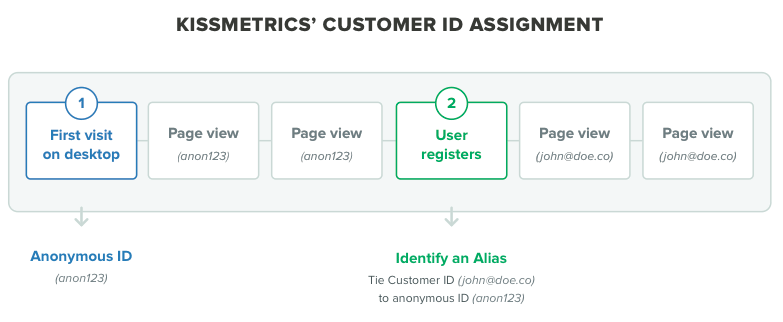
When a person visits your website for the first time, both Kissmetrics and Google Analytics assign an anonymous ID to that person.
For Google Analytics, the visit and registration must take place in the same visit session. If a person visits your website, leaves, and then comes back 10 days later and registers, only the last session is tied to the user ID. The first session is lost. Google Analytics connects data from only the session in which the user was identified. The only way around this is to find a way to identify people during as many sessions as possible.
KISSmetrics customer ID assignment
With Kissmetrics, all data from a person’s previous sessions is assigned to an alias.
That’s the core tracking summary of the two. But, they can differ depending on the situation.

2. What Happens to Data from Sessions after Someone is Identified?

Joey visits your site, registers, logs out, and closes the browser. He comes back a week later and doesn’t register or log back in. What happens to the data from the second visit?
With Kissmetrics, all this data still gets tied to Joey because his device was cookied.
Google Analytics isn’t as simple. You’ll need to send the user ID every time there’s a Google Analytics hit. So every piece of Google Analytics data needs a user ID attached to it. There is session unification that will stitch together any other hits that happen in the same session. But, every session needs a user ID defined in order to connect that session to a person. In Joey’s case, Google Analytics would assume that his second visit was a different person.

3. What Happens to Session Activity from Several Devices?

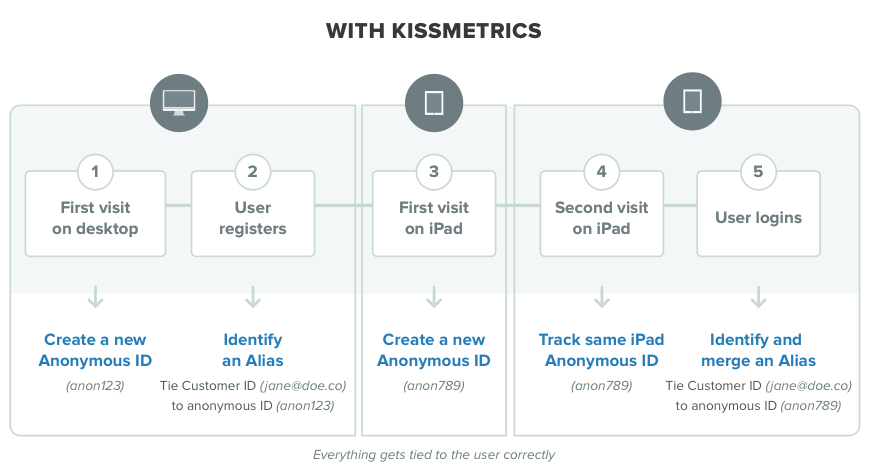
1) Anna registers on your site from her desktop.
2) A week later, she visits your site on her iPad but doesn’t log in.
3) Later that day, she visits your site again, this time logging in with her iPad.
With Kissmetrics, all the data from her desktop gets assigned to her alias once she registers. When she visits on her iPad, Kissmetrics assigns her a new anonymous ID. Kissmetrics doesn’t know this visitor is Anna until she logs in on her iPad. Once she logs in, all the sessions from her iPad are tied back to the ID she originally created when she registered on her desktop.
KISSmetrics user assignment
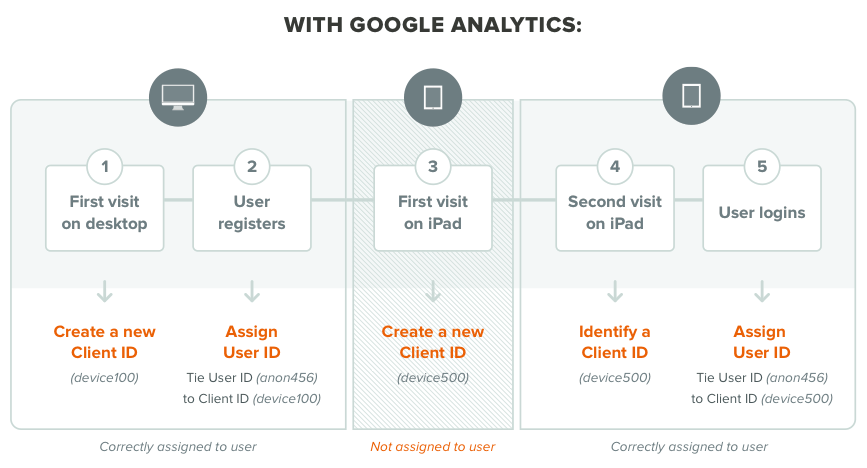
user assignment google analytics
Anna registered on her first visit, so the activity from that session gets tied to her newly registered User ID. Since Anna’s second visit was on a new device and she didn’t log in, that data gets lost.
All her sessions going forward (on the same device) will be correctly assigned to her. The same goes for when she visits on another device. Once she logs in on a device, the data from that same session gets tied back to the User ID that was assigned when she registered on her desktop.
Remember that Google Analytics connects data only from the session in which the user was verified.

4. What Happens When Multiple People Use the Same Device?

Brenda is looking for tickets to a show tonight. She visits your site via a hotel PC, doesn’t find any tickets that she likes, and leaves.
Steve also is looking for tickets. He visits your site using the hotel’s PC, finds tickets that he likes, and registers and pays for them.
How do Kissmetrics and Google Analytics handle this?
With Kissmetrics, the data from Brenda gets assigned to Steve once he registers. So, all previous visits to your site from that same computer get tied to Steve. There is no technical way around this.
On the other hand, Google Analytics will report the correct data in this case. Since Brenda visited the site but didn’t register, her session is lost. Since Steve registered on the same session as his visit, that data gets correctly tied to him.

5. What Happens When Multiple People Are Logging in on the Same Device?

Let’s go back to the previous example with Brenda and Steve using the same device to access the same website.
This time, Brenda logs in, looks at a bunch of tickets, and then logs out. Steve comes by later that day and registers.
How does Kissmetrics handle this?
When Brenda visits the site and logs in, all the data gets correctly tied to her.
But, when Steve visits and registers, Kissmetrics still thinks it is Brenda visiting the website. Anything that Steve does before he registers gets tied back to Brenda’s customer ID. Once Steve registers, Kissmetrics sees this as a new person and connects all future data to his customer ID.
With Kissmetrics, you can do a clearIdentity call. This would clear Brenda’s ID once she logs out and assign a new anonymous ID when the next person visits from that computer. Then, once Steve registers, all the data from Brenda’s logout to Steve’s registration gets tied to Steve’s customer ID.
You will be able to do this only during logout events. You won’t be able to reset all named ID’s after each visit.
Google Analytics handles this correctly. When Brenda visits and logs in, all the data from her session gets tied to her ID. Then, when Steve visits and registers, all the data from his visit gets correctly assigned to him.

Tracking Summary

Analytics need to make one of two assumptions when tracking users:
  • Each visit from the same device is coming from the same person.
  • Each visit should be treated as a new person until they identify themselves.
Kissmetrics assumes that activity on one device is coming from the same person. If one of your users visits your site on their desktop, tablet, and phone, Kissmetrics will recognize them once they sign in and tie them back to their customer ID.
Google Analytics assumes that each visit is from a new person. The only way around this is to identify people in each session in order to see everything that person does.

Use Cases

Kissmetrics is not a replica of Google Analytics. Yes, they both are analytics tools, but they each have their own use cases. Let’s run through some common use cases and which tool is a better fit.

Tracking Visitors and Visits

If this is what you want to track, go with Google Analytics. While Kissmetrics can track visitors, it doesn’t make sense to use it if that’s all you want to do.

Tracking Bounce Rate, Time on Page, and Exits

Use Google Analytics for these metrics. You cannot currently track these in Kissmetrics.

Funnels

You can set up funnels in Google Analytics, but there are a few disadvantages:
  • When you set up funnels, you can view data going forward only. You will not be able to view data that happened before the funnel was set up.
  • You can track consecutive steps that people go through only if they are on the same visit. So, the data is gone if people complete a process over multiple visits or drop out of the defined path. If you want to track only sign-up flows or e-commerce checkout (you won’t be able to track the number of people who put an item in the cart), you can go with Google Analytics. You won’t be able to build your entire customer acquisition funnel.
By contrast, the Kissmetrics funnels are able to retrieve historical data. So, you can set up your sign-up funnel and view how it has been performing over the months that you’ve been tracking. And, it doesn’t matter if someone visits your website today but doesn’t complete the funnel until six months later. Kissmetrics retains all their data.

Conversion Tracking

Some people may want to get a little more advanced with their analytics and begin tracking conversions. By tracking conversions, you’re looking at the percentage of people who have done some important action on your site, such as signing up for your newsletter, downloading a white paper, or placing an order.
With Google Analytics, you’ll have to set up goals. Also, there is a 90-day limit with conversions. By default, conversions have to happen on the same visit. This is useful if you’re testing and want a conversion to happen right away, such as signing up for a trial. But, if you want to go deeper, it’ll get a little more challenging. The only way around this is to use multi-channel funnels. You’ll have to use a specific report and be careful about which conversion data you’re looking at.
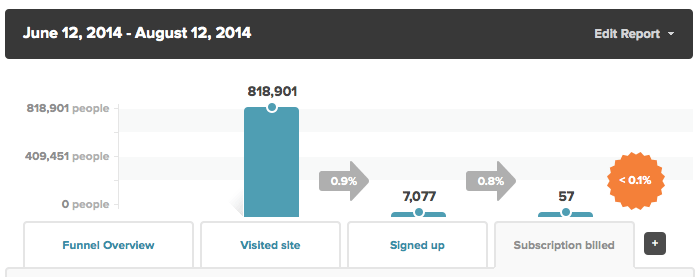
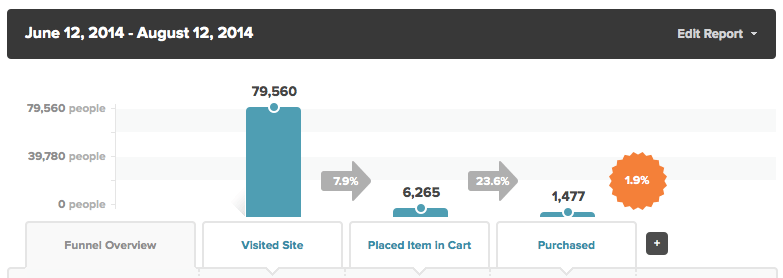
In Kissmetrics, you’ll need to set up a funnel report to track conversions. A common funnel report is tracking the number of people who have signed up or placed an order. Here’s how it might look for a SaaS company:
conversion funnel report
Here, we are looking at people who have visited the site, signed up for a trial, and then converted to paying for a subscription. For an e-commerce company, a sales funnel might look like this:
conversion funnel KISSmetrics
In this funnel, we’re tracking the number of people who visited the site, placed a product in their cart, and then proceeded to purchase.

A/B Testing

In Google Analytics, you can set up content experiments to act as your A/B testing tool. To run the test, you’ll have to build out two separate URLs (i.e., www.example.com/control and www.example.com/variant1). This can be challenging if you’re testing your home page, as there may be hundreds of backlinks to one URL. You’ll be able to get around this if you have developers on your team. But, it’ll be more difficult if you’re left to your own devices.
Another downside is the conversions must happen on the same visit. If people leave your site between steps, they won’t get counted.
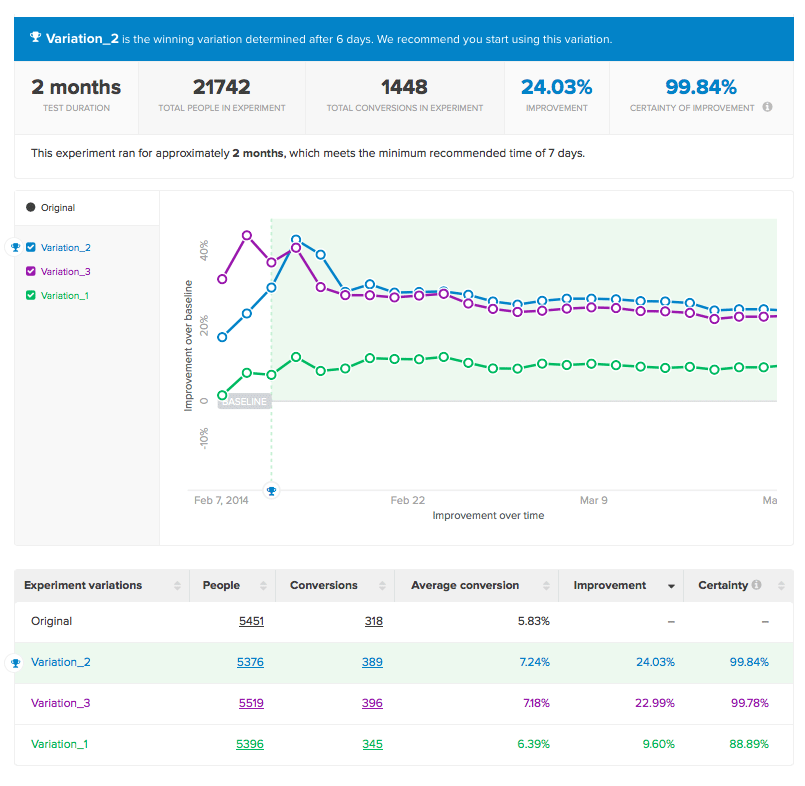
With Kissmetrics, you can integrate with an A/B testing tool like Optimizely and connect that data to the A/B test report. All your data gets connected back to actual people. Here’s what the report looks like:
ab test results KISSmetrics
You can view people by clicking on a number under the People column, which shows you all the people in the variation. Or, you can view only the people who converted by clicking on a number under the Conversions column.

Cohort Reports

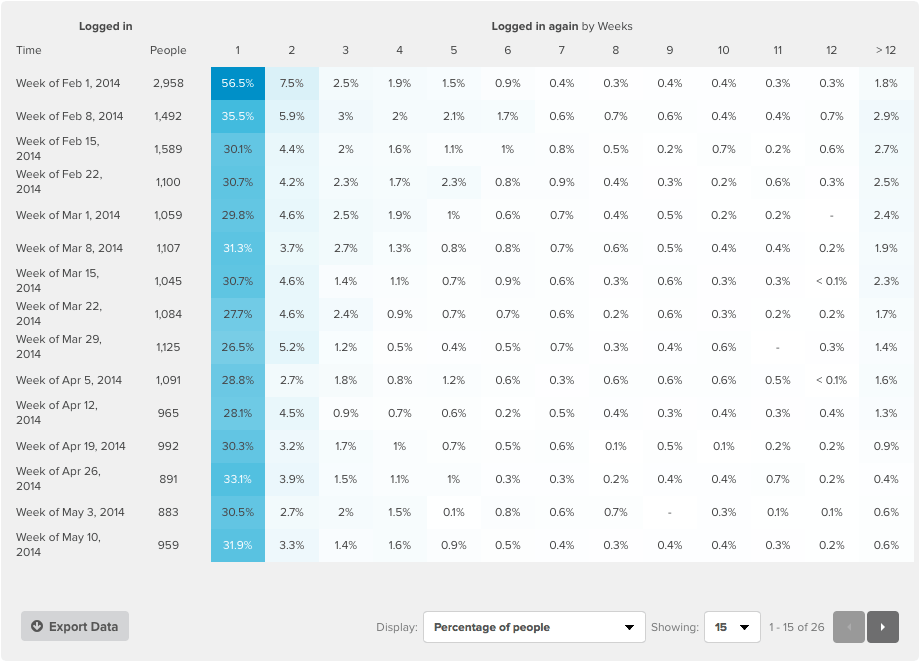
People can be divided into groups, or cohorts, based on actions they took. A prime example of this would be tracking login retention over time. With a cohort report, you would track people who logged in during a specified time range (typically a day or week), and then you would see how often those people log back in (by day or by week) after that specified time range. Here’s what a report like that would look like in Kissmetrics:
cohort report KISSmetrics
Google Analytics includes a Cohort Analysis tool. It is still in the Beta stage, and usability is somewhat limited when compared to more advanced cohort reporting tools. Here’s the top half of the report:
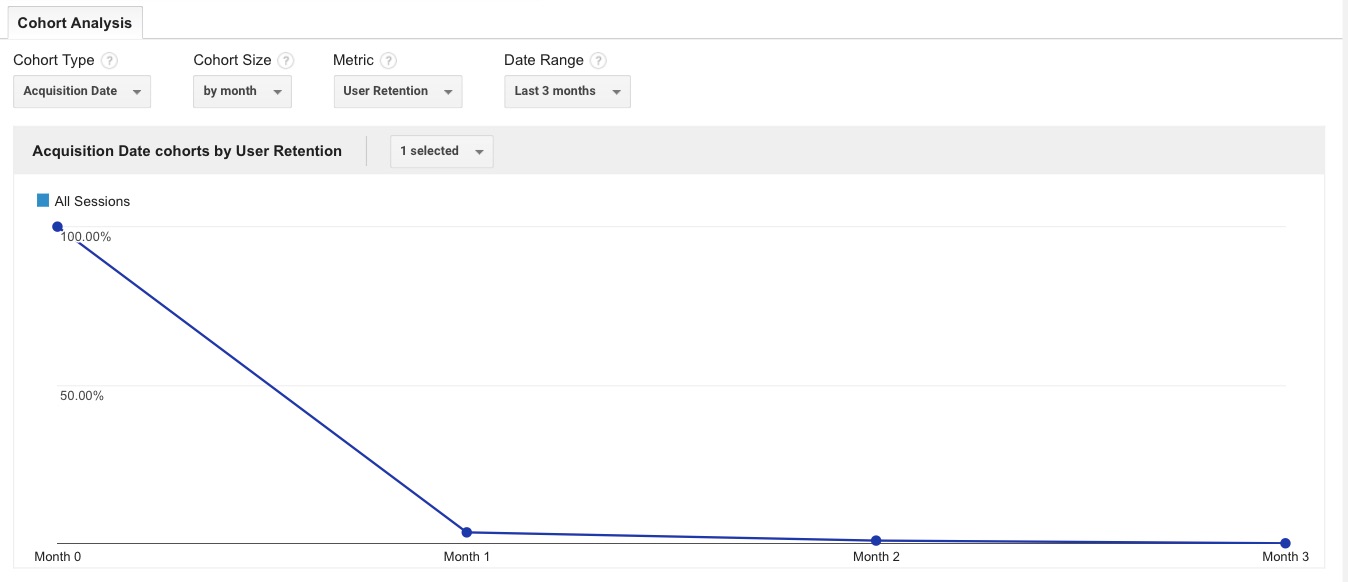
cohort-analysis-google-analytics-top-half
You have four options above the graph – the acquisition type, cohort size, metric, and date range.
Cohort Type 
This is where you choose a cohort. Acquisition Date, for example, groups people based on when they first came to your site.
Cohort Size
Here you choose the time frame for each cohort. You can measure people on a daily, weekly, or monthly basis.
Metric
Here you choose what you’ll be measuring for each cohort. There are a variety of choices.
Date Range
You have a variety of date ranges you can choose from. This is determined by the size of your cohort. For example, if you choose a cohort size “by day” you’ll have the date range options of 7, 14, 21, and 30 days. You cannot choose a custom date range.
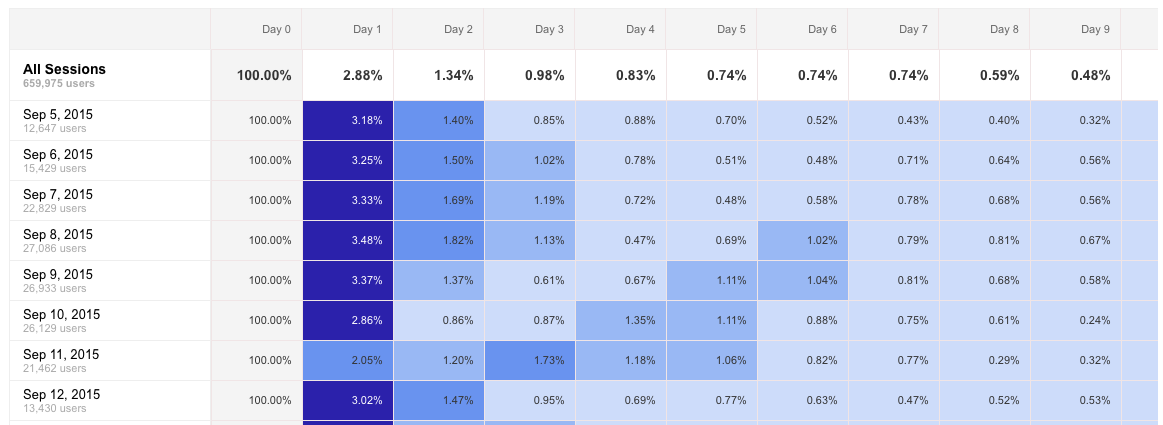
You can mix and match this however you’d like and the graph underneath it will reflect the criteria. Underneath the graph is the individual metrics. Here we see it broken down by day:
google-analytics-cohort-analysis-buckets
This is similar to the Kissmetrics Cohort Report layout. Each date range gets displayed in buckets, with darker colors representing higher percentages. If you already have a Google Analytics account, you can login (Audience > Cohort Analysis) and test it out to see if it meets your needs. If you’re looking for something more advanced and customizable (with support), the Kissmetrics Cohort Report would be your best choice.

Using Google Analytics in Conjunction with Kissmetrics

Google Analytics can provide a world of insight into how visitors interact with your website. Nearly every website you visit uses it, including the blog you’re on now. We also use it on our main Kissmetrics.com page.
Many of our customers use Google Analytics alongside Kissmetrics. We use Google Analytics to get session data, view a general engagement on a page (time on page and site), and check referral data. We use our own product for our web app to get insights into how our customers are using our product, discover our customer acquisition channels, track our acquisition funnel, document our A/B tests, and gather data that can help us make better decisions.
Some of the content from this post was inspired by the post The Full Customer Journey – Managing User Identities with Google Universal, Mixpanel and Kissmetrics by Shay Sharon.

courtesy by--> KISSMETRICS

Thursday, 5 November 2015

Top 10 Copywriting Books

I love Top 10 Lists … and so does everybody else.
In fact, after analyzing 100 million articles for traffic, shares, and conversions, Noah Kagan calls 10 the “magic number.”
The only thing I love more than Top 10 Lists are books.
That’s why over the last week I’ve reached out to the best of the best online copywriters with a simple question:
What’s your all-time, top-favorite copywriting book … and your all-time, top-favorite quote?
The response has been amazing. Huge thanks to everyone who contributed.
So, without further ado, here are the …
Top 10 Copywriting Books from the Top 10 Online Copywriters.

1. Brian Clark

CopyBlogger (Founder)

The first entry in our list of Top 10 Copywriting Books is a time-tested classic … on testing.
As Brian puts it:
When going back to the source of ad copy that is both audience and benefit-focused (as well as backed up by empirical testing), many will point to Claude Hopkins and Scientific Advertising from 1923.
I own that book too, but my favorite “old school” copywriting book is the updated version of John Caples’ Tested Advertising Methods.
Timeless advice, but written in an easily-digested modern tone.
Favorite Quote:
There are four important qualities that a good headline may possess. They are:
  1. Self-Interest
  2. News
  3. Curiosity
  4. Quick, easy way …
Advertising can never become completely accurate, however, because of the human element involved — in advertising you are dealing with the minds and the emotions of human beings, and these will always be, to a certain extent, unstable and unmeasurable.
That is why it is necessary to test, test, test — to test copy, media, position in publications, seasonal variation, and time of day in broadcast advertising.

2. Joe Pulizzi

Content Marketing Institute (Founder)

Schultz’ book isn’t necessarily about copywriting itself, so you’ll have to forgive me for putting it on the list of Top 10 Copywriting Books.
The reason for it’s inclusion, however, is simple.
Joe calls it “the most influential on me and how I thought about marketing.”
As the book explains, Integrated Marketing Communications:
Challenges business to confront a fundamental dilemma in today’s marketing — the fact that mass media advertising, by itself, no longer works. This landmark book reveals that strategies long used to deliver selling messages to a mass culture through a single medium are now obsolete — and shows marketers how to get back on track.
The answer lies in customer-focused marketing, a key planning tool that can — in today’s diverse, fragmented marketplace — explain the lifestyles, attitudes, and motivations of distinct buyer groups and predict their likely buying behaviors in the future.
Favorite Quote:
If you have tried to do something and failed, you are vastly better off than if you had tried nothing and succeeded.

3. Bernadette Jiwa

The Story of Telling

Arden began his career in advertising at the age of 16 and for 14 years was Executive Creative Director at Saatchi and Saatchi. There he managed campaigns for British Airways, Silk Cut, Anchor Butter, InterCity and Fuji.
It’s Not How Good You Are, It’s How Good You Want to Be is a “handbook of how to succeed in the world — a pocket ‘bible’ for the talented and timid to make the unthinkable thinkable and the impossible possible.”
Favorite Quote:
Do not covert your ideas.
Give away everything you know and more will come back to you.

4. Joanna Wiebe

CopyHackers

Scientific Advertising by Claude Hopkins
With endorsements from copywriting giants like David Ogilvy, Gary Halbert, and Jay Abraham, Scientific Advertising is another of the Top 10 Copywriting Books that’s earned its place.
Written in 1923, Hopkins’ text is imminently practical and built — just like Joanna — on the fundamental principle of testing, testing, testing.
Even better, if you buy the book from Amazon, you also get My Life in Advertising.
Favorite Quote:
Some say, “Be very brief. People will read but little.”
Would you say that to a salesman?
With a prospect standing before him, would you confine him to any certain number of words?
That would be an unthinkable handicap.
And my personal favorite:
Good selling is based on good testing.
You see other ads which you may not like as well.  They may seem crowded or verbose. They are not attractive to you, for you are seeking something to admire, something to entertain.  But you will note that those ads are keyed.  The probability is that out of scores of traced ads the type which you see has paid the best.
Don’t judge an ad by how it looks.
Instead, judge it by how well it converts.

Bonus Addition to the Top 10 Copywriting Books

I can’t help but mention Joanna’s ebooks as some of own personal favorites.
If you write online in any capacity … stop reading this, jump over to CopyHackers right now, and pick up The Super Mega Brainy Bundle: All 7 Copy Hackers Ebooks in 1.
Here’s what you’ll get …
  1. Where Stellar Messages Come From (2nd Ed.)
  2. Headlines, Subheads & Value Propositions (2nd Ed.)
  3. Buttons & Click-Boosting Calls to Action (2nd Ed.)
  4. Formatting & Better Body Copy (2nd Ed.)
  5. The Dark Art of Writing Long-Form Sales Pages
  6. The Startup Guide to Differentiation
  7. The Great Value Proposition Test
The worksheets and swipe files are worth the price alone.

5. Demian Farnworth

CopyBlogger Chief Copywriter & theCopyBot

Sugarman is a living legend.
Once called the “Mail Order Maverick” by The New York Times, Advertising Secrets of the Written Word not only lives up to its title — The Ultimate Resource — but also its price … the going rate on Amazon is just under $90.
The book itself covers 17 axioms to write truly persuasive (i.e., sales-generating) copy and is full of swipe-worthy examples and tons of practical advice.
Favorite Quote(s);
Copywriting is a mental process the successful execution of which reflects the sum total of all your experiences, your specific knowledge and your ability to mentally process that information and transfer it onto a sheet of paper for the purpose of selling a product or service.
All the elements in an advertisement are primarily designed to do one thing and one thing only: get you to read the first sentence of the copy.
The sole purpose of the first sentence in an advertisement is to get you to read the second sentence of the copy.

6. Peep Laja

ConversionXL

According Peep, “Most books are about writing copy from scratch. Very few address the more common need: improve the copy I already have.”
That’s where Copy Logic! comes in to help our list of Top 10 Copywriting Books:
In this book, direct-marketing expert Michael Masterson and master copywriter Mike Palmer reveal their methodical, step-by-step process for turning “B-level” copy into control beating “A-level” copy in just 24 hours.
This is the exact process that was directly responsible for helping one company boost its revenues into the $300-million-a-year range (while creating six-figure incomes for many of its copywriters).
Favorite Quote:
We realize then that we had been trying to compete with a disadvantage. We were balancing our promotions on three legs. Our competitor was balancing theirs on four.
Thus we initiated what we called the Four-Legged Stool Test.
A properly built sales letter, we concluded, must contain four distinct and important elements:
  1. A big or unifying idea.
  2. A substantial promise of benefit supported by subordinate claims.
  3. Ample proof for each of those claims.
  4. Evidence that the product, product provider, and person behind the sales letter are all credible and trustworthy.

7. Amy Harrison

HarrisonAmy.com

Perhaps most famous for its definitive “features versus benefits” checklist — including a twenty-two point examination of a No. 2 pencil — The Copywriter’s Handbook has it all.
In fact, this was the first book I picked up years ago when I entered the online world of copywriting.
And just like Amy, it’s hands down one of my own Top 10 Copywriting Books.
Favorite Quote:
Many big agency copywriters and creative directors will tell you that advertising writers don’t follow rules, and that “great” advertising breaks the rules.
Maybe so.
But before you can break the rules, you have to know the rules.

8. Henneke Duistermaat

Enchanting Marketing

Again, while Made to Stick may not be — strictly speaking — one of the Top 10 Copywriting Books, it will “transform the way you communicate ideas”:
It’s a fast-paced tour of success stories (and failures) — the Nobel Prize-winning scientist who drank a glass of bacteria to prove a point about stomach ulcers; the charities who make use of “the Mother Teresa Effect”; the elementary-school teacher whose simulation actually prevented racial prejudice.
Provocative, eye-opening, and often surprisingly funny, Made to Stick shows us the vital principles of winning ideas — and tells us how we can apply these rules to making our own messages stick.
The book is organized around Chip and Dan’s “Six Principles of Sticky Ideas”:
  1. Simplicity
  2. Unexpectedness
  3. Concreteness
  4. Credibility
  5. Emotions
  6. Stories
Favorite Quote:
Concreteness is an indispensable component of sticky ideas.
What makes something “concrete”?
If you can examine something with your senses, it’s concrete. A V8 engine is concrete. “High performance” is abstract.
Most of the time, concreteness boils down to specific people doing specific things.
Concrete language helps people, especially novices, understand new concepts. Abstraction is the luxury of experts.
If you’ve got to teach an idea to a room full of people, and you aren’t certain what they know, concreteness is the only safe language.

9. Jen Havice

Make Mention Media

In Jen’s words:
That’s a tough one since I’m not generally a big fan of books on copywriting. The only ones I’ve found super useful have been Joanna’s and the one by Gene Schwartz.
If I had to pick a favorite, I’d say The Fortune Cookie Principle by Bernadette Jiwa.
It’s a bit more of a branding book but it’s great at getting you to hone in on what’s most important to convey to your customers.
The Fortune Cookie Principle comes down to two simple equations:
Product – Meaning = Commodity
Product + Meaning = Brand
Favorite Quote:
Think of your content and copy as being like a first date.
It’s the way your brand starts establishing the kind of relationship that leaves people wanting more.

10. Me

( you’re already here! )

Breakthrough Advertising by Eugene Schwartz
I’m sure that including myself on a list entitled Top 10 Copywriting Books from the Top 10 Online Copywriters is presumptuous … and more than a little egotistical.
But I couldn’t resist.
Not because I’m so great … but because Breakthrough Advertising is.
How great?
Well, if you thought $90 was a lot to pay for a book on Amazon, Schwartz clocks in at $215.15. And it’s worth every penny.
In fact, it’s so good, I wrote up an entire series on it’s most practical insights and applied them directly to online copywriting …
Favorite Quote:
Five to ten words will make up about 90% of the value of your ad.
If you are right, they may start a new industry.
If you are wrong, nothing you write after them will save your ad.
And another:
The power, the force, the overwhelming urge to own that makes advertising work, comes from the market itself, and not from the copy.
Copy cannot create desire for a product.
It can only take the hopes, dreams, fears and desires that already exist in the hearts of millions of people, and focus those already existing desires onto a particular product.
This is the copywriter’s task: not to create this mass desire — but to channel and direct it.

ONE MORE Top 10 Copywriting Books BONUS

11. Oliver

The Handsome Dog

Dancing Dogs: How to Make Palz and Win Ritz by Oliver
This is one name you probably don’t recognize … but he’s got an avid and growing following on Twitter.
Few people would have the gaul to recommend their own book for a Top 10 list, but if anyone can pull it off, it’s Oliver.
Favorite Quote:
Lots of people blog.
I tap dance … and blog.
Oh, and I get paid in Ritz. Just ask my lady.

courtesy by--> Iconicontent